How vCIO Software Transforms Client Relationships and Business Reporting
Jennifer Giraldo
Invarosoft Team
Client expectations are evolving in managed IT services. They’re no longer satisfied with reactive support and technical fixes they want strategic guidance, transparency, and forward-thinking solutions. Enter vCIO software, a powerful tool that enables MSPs and IT teams to shift from mere service providers to trusted technology advisors.
vCIO (Virtual Chief Information Officer) software streamlines client engagement, automates IT reporting and delivers business-focused insights. It bridges the gap between technical operations and strategic planning, helping service providers foster long-term partnerships built on value, not just uptime.
This article explores how vCIO software transforms client relationships, simplifies reporting, and positions MSPs as indispensable advisors.
What Is a vCIO?
A vCIO, or Virtual Chief Information Officer, is a role within a managed service or IT support business that focuses on helping clients make strategic technology decisions. Unlike a technician or helpdesk role, a vCIO operates at a business leveladvising clients on budgeting, risk management, IT compliance, infrastructure planning, and more.
What Is vCIO Software?
vCIO software is a tool for IT service providers and Managed Service Providers (MSPs). It helps them fulfil the functions of a chief information officer (CIO) for their clients. They can provide strategic IT guidance, including creating budgets, reviewing IT performance, and improving security. vCIO Software is scalable and consistent across your entire client base.
2 Ways vCIO Software Transforms Client Relationships and Reporting
1\. Enhances Client Engagement
vCIO software centralises and automates key elements of client communication. It becomes the strategic interface between your MSP and your client’s leadership team. Here’s how it transforms relationships:
#### Improved Transparency
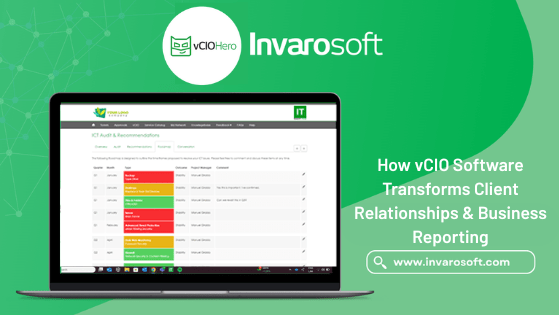
Clients see what’s happening with their IT environment through simple, visual reporting. Risk assessments, asset statuses, and upcoming needs are presented in one place.
#### Strategic IT Planning
You can plan technology upgrades, compliance actions, and budgeting decisions using interactive roadmaps, fostering trust and long-term alignment.
#### Automated QBRs
Quarterly Business Reviews (QBRs) are easier to produce and more impactful when backed by live data and polished visuals. This positions your team as proactive rather than reactive.
#### Data-Driven Decisions
By aggregating asset lifecycles, warranty info, compliance scores, and system health in one place, you empower your clients to make smart, timely IT investments.
2\. Streamlines Reporting
Adopting a vCIO platform goes beyond saving admin hours. It creates measurable improvements in business performance. Here’s how implementing vCIO Software impacts business:
- Time saved: Reduce QBR prep time from days to minutes.
- Stronger retention: Clients stay longer when they understand your strategic value.
- Increased revenue: Clear roadmaps make it easier to justify and sell projects.
- Reduced risk: Identify and mitigate compliance or operational vulnerabilities early.
Most importantly, it transforms your clients’ perception of your services from an operating cost to a strategic partner.
The Key Features of vCIO Software
vCIO software key features include the following:
| Feature | Benefits |
| IT Risk Assessments | Identify vulnerabilities across infrastructure, users, and compliance. |
| Lifecycle & Warranty Tracking | Plan replacements before failure, avoiding downtime and budget surprises. |
| IT Roadmapping | Align tech upgrades with business goals using visual plans. |
| QBR Automation | Generate branded, consistent reports in minutes instead of hours. |
| Client Portal | Allow clients to access live data, updates, and roadmap progress. |
| Budget Forecasting | Help clients understand costs before they occur, fostering better decisions. |
Best Practices for Using vCIO Software
To get the most out of your platform, here are some tips:
- Standardise your QBR schedule: Use software templates to ensure every client receives timely updates.
- Customise reports for each client: Tailor roadmaps and recommendations to their specific business goals.
- Use visuals strategically: Diagrams, charts, and status indicators improve clarity and speed decision-making.
- Encourage portal usage: Clients who log in regularly are more likely to stay engaged and proactive.
Who Benefits from vCIO Software?
Although most commonly used by MSPs, vCIO software is also valuable for:
- Internal IT teams in mid-sized enterprises seeking structured IT planning.
- IT consultants managing multiple client environments.
- CIOs or technology leaders wanting a better way to present information to boards and stakeholders.
If you’re responsible for communicating complex IT strategies to non-technical audiences, vCIO software will become one of your most powerful tools.
Why Traditional Client Reporting Falls Short?
vCIO tasks are often cobbled together without dedicated tools using spreadsheets, Word docs, and email threads. These manual processes are not only time-consumingthey’re also inconsistent and error-prone. As a result, many MSPs struggle to:
- Deliver clear and digestible business reports.
- Track IT improvements or technical debt over time.
- Present roadmaps that align with client business goals.
- Justify technology investments and budgets.
Frequently Asked Questions (FAQs)
Here are answers to some frequently asked questions about vCIO software.
- What makes vCIO software different from PSA or RMM tools? While PSA (Professional Services Automation) and RMM (Remote Monitoring and Management) tools help run day-to-day operations, vCIO software focuses on strategic planning and client engagement, specifically around business outcomes, not just tickets or uptime.
- Can vCIO software help with compliance? vCIO software includes compliance frameworks, risk assessments, and audit trails that help clients stay on top of regulatory requirements.
- Do I need to be a large MSP to benefit? Solo consultants or small IT teams can use vCIO tools to deliver more professional, structured services and win client trust.
- Will my clients understand the reports? vCIO platforms simplify technical data into traffic-light visuals, short summaries, and digestible insights so business leaders can make informed decisions.
Book a Demo
Great IT relationships aren’t built on ticket closures but on trust, transparency, and shared goals. With vCIO software, you can transform client interactions into strategic conversations and build loyalty, growth, and reputation.
Schedule a demo online today to get started.
This site is protected by reCAPTCHA and the Google Privacy Policy and Terms of Service apply.
Recaptcha requires verification.
protected by reCAPTCHA
reCAPTCHA is changing its terms of service. Take action.