Invarosoft® | MSP Stack Saver Bundles

Consolidate Your MSP Stack & Save on PSA tools

Stop managing multiple vendors and paying for disconnected tools. Our modern MSP tech Stack Saver Bundles deliver six powerful solutions in one unified platform, reducing your software overhead while enhancing operational efficiency.
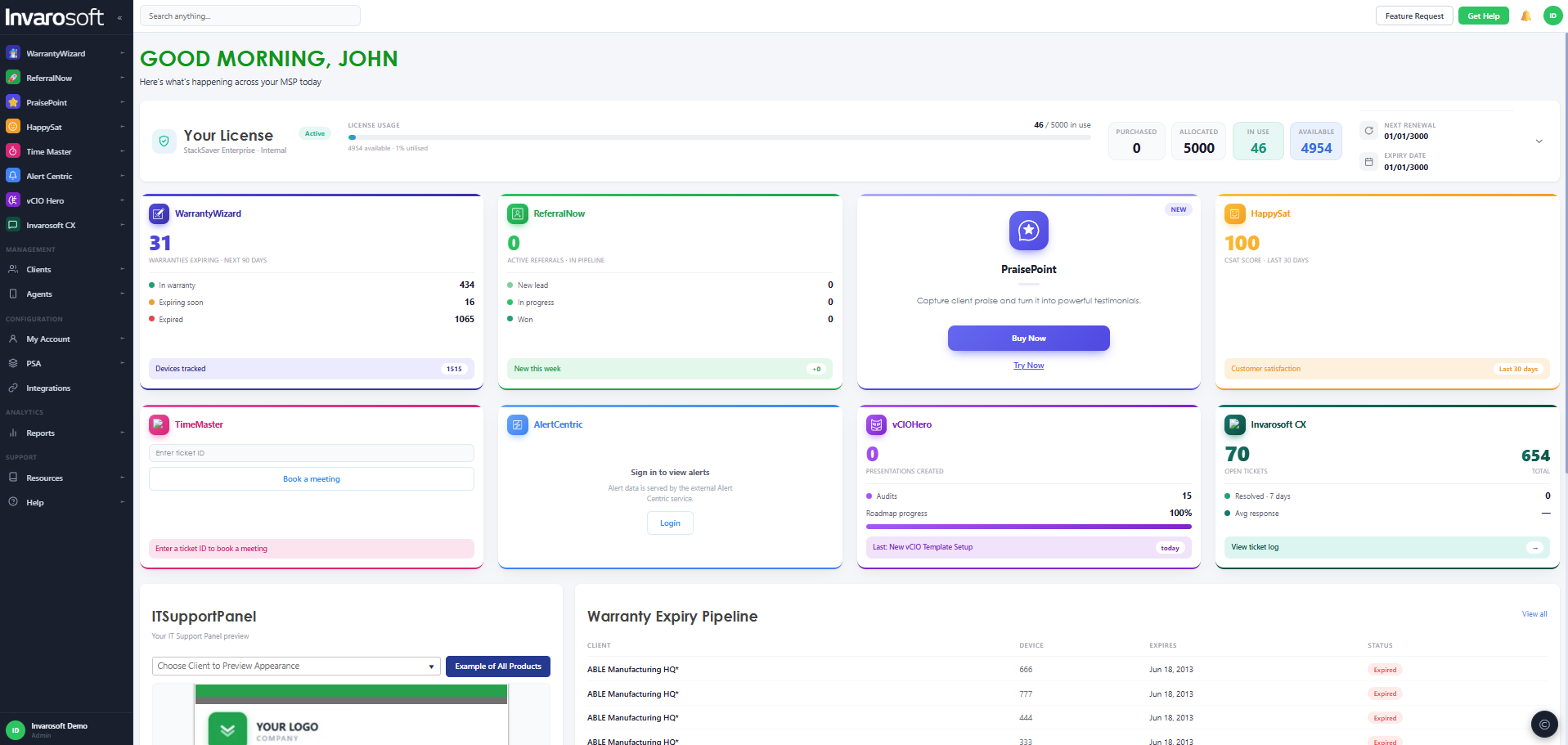
Transform your MSP stack with integrated tools that work seamlessly together: client portal, vCIO platform, warranty management, customer feedback, intelligent scheduling, and backup monitoring—all from one trusted provider.
Choose from the stack option bundle that fits your business operations best. The right MSP tech stack has all the Professional Services Automation (PSA) core tools you need. And it starts with Invarosoft.

Start your free trial

All features included. No credit card needed.

  • Invarosoft® | MSP Stack Saver Bundles
  • Invarosoft® | MSP Stack Saver Bundles
  • Invarosoft® | MSP Stack Saver Bundles
  • Invarosoft® | MSP Stack Saver Bundles
  • Invarosoft® | MSP Stack Saver Bundles
  • Invarosoft® | MSP Stack Saver Bundles
  • Invarosoft® | MSP Stack Saver Bundles

Stack Saver Business

$149 USD / Month

149 cents per user

Get Started

is include:

  • Warranty Wizard™
  • Alert Centric™
  • Warranty Reporting
  • HP, Dell & Lenovo
  • Workstation & Server
  • PDF Client Report
  • Sales Dashboard
  • PSA & RMM Sync
  • Backup Alert Reporting
  • Software Alert Reporting
  • Daily Alert Report
  • All Backup Vendors
  • ConnectWise
  • AutoTask
  • Halo PSA
  • Kaseya BMS
  • Syncro
  • Repair Shopr
  • PSA Agnostic
  • 24x7 Support
  • On-Boarding & Training
  • Self-Service Training
  • Dedicated Success Team

Stack Saver Advanced

Most Popular

$199 USD / Month

199 cents per user

Get Started

is include:

  • Warranty Wizard™
  • Alert Centric™
  • Time Master™
  • HappySat™
  • Warranty Reporting
  • HP, Dell & Lenovo
  • Workstation & Server
  • PDF Client Report
  • Sales Dashboard
  • PSA & RMM Sync
  • Backup Alert Reporting
  • Software Alert Reporting
  • Daily Alert Report
  • All Backup Vendors
  • Engineer Scheduling
  • Teams, Zoom, Outlook
  • PSA Integrated
  • Ticket Note Integration
  • All PSAs
  • CSAT Feedback
  • NPS™ Feedback
  • Dashboard
  • Reports
  • PSA Integrated
  • ConnectWise
  • AutoTask
  • Halo PSA
  • Kaseya BMS
  • Syncro
  • Repair Shopr
  • PSA Agnostic
  • 24x7 Support
  • On-Boarding & Training
  • Self-Service Training
  • Dedicated Success Team

Stack Saver Premium

$249 USD / Month

249 cents per user

Get Started

is include:

  • Warranty Wizard™
  • Alert Centric™
  • Time Master™
  • HappySat™
  • vCIO Hero™
  • Warranty Reporting
  • HP, Dell & Lenovo
  • Workstation & Server
  • PDF Client Report
  • Sales Dashboard
  • PSA & RMM Sync
  • Backup Alert Reporting
  • Software Alert Reporting
  • Daily Alert Report
  • All Backup Vendors
  • Engineer Scheduling
  • Teams, Zoom, Outlook
  • PSA Integrated
  • Ticket Note Integration
  • All PSAs
  • CSAT Feedback
  • NPS™ Feedback
  • Dashboard
  • Reports
  • PSA Integrated
  • QBR Platform
  • ICT Audit
  • ICT Recommendations
  • ICT Roadmap Report
  • Good / Better / Best
  • O365 User Reports
  • O365 Secure Score Reports
  • Device Report
  • Warranty Report
  • ConnectWise
  • AutoTask
  • Halo PSA
  • Kaseya BMS
  • Syncro
  • Repair Shopr
  • PSA Agnostic
  • 24x7 Support
  • On-Boarding & Training
  • Self-Service Training
  • Dedicated Success Team

Stack Saver Enterprise

$299 USD / Month

299 cents per user

Get Started

is include:

  • Warranty Wizard™
  • Alert Centric™
  • Time Master™
  • HappySat™
  • vCIO Hero™
  • Invarosoft CX™
  • Warranty Reporting
  • HP, Dell & Lenovo
  • Workstation & Server
  • PDF Client Report
  • Sales Dashboard
  • PSA & RMM Sync
  • Backup Alert Reporting
  • Software Alert Reporting
  • Daily Alert Report
  • All Backup Vendors
  • Engineer Scheduling
  • Teams, Zoom, Outlook
  • PSA Integrated
  • Ticket Note Integration
  • All PSAs
  • CSAT Feedback
  • NPS™ Feedback
  • Dashboard
  • Reports
  • PSA Integrated
  • QBR Platform
  • ICT Audit
  • ICT Recommendations
  • ICT Roadmap Report
  • Good / Better / Best
  • O365 User Reports
  • O365 Secure Score Reports
  • Device Report
  • Warranty Report
  • Client Portal
  • ITSupportPanel App
  • All Devices
  • Live Chat
  • Identity Security
  • Secure Messaging
  • Push Alerts
  • Ticket View (PSA Integrated)
  • Service Catalog
  • Knowledgebase
  • O365 Reports
  • O365 Secure Score Reports
  • Warranty Reports
  • Self-Service Bots
  • Training Bots
  • Smart Engineer Bots
  • ITNewsPanel
  • ITAppsPanel
  • Sentiment Analysis
  • White Labelled
  • 5 Languages
  • WisePay
  • ConnectBooster
  • Bigger Brains
  • ConnectWise
  • AutoTask
  • Halo PSA
  • Kaseya BMS
  • Syncro
  • Repair Shopr
  • PSA Agnostic
  • 24x7 Support
  • On-Boarding & Training
  • Self-Service Training
  • Dedicated Success Team

Why Consolidate Your MSP Stack?

Most managed service providers struggle with an overcomplicated tech stack that drains resources and hampers productivity. Multiple vendor relationships mean multiple invoices, separate operating system training requirements, inconsistent user experiences across support requests, and integration headaches that consume valuable time and impact business continuity.

Our Stack Saver Bundles simplify it all. We combine the essential tools every MSP needs into one comprehensive platform. When your MSP technology stack works together natively, you make client management a breeze, with all the core components for your PSA software working together seamlessly for ultimate customer satisfaction.

Complete Modern MSP Tech Stack in One Platform

Quality PSA Tools make all the difference for businesses. But choosing MSP tools with integration capabilities is where you can really make a difference in your business. Give up outdated software that doesn’t consolidate, and choose Invarosoft for the MSP tech stack that gives you additional tools at a fraction of the cost.

Six Powerful Tools, One Unified Solution

Invarosoft CX™

Transform client communication with the industry’s leading client portal featuring live chat, secure messaging, identity security, push notifications, self-service bots, and complete PSA integration for more than just a regular ticketing system. Give clients 24/7 visibility into tickets, services, O365 reports, device status, and warranty information through a beautifully branded experience on any device.

vCIO Hero™

Elevate your strategic consulting with professional ICT audits, compelling recommendations using proven Good-Better-Best methodology, and visual roadmaps that drive client investment. This component of your MSP stack helps increase project acceptance rates and average deal values through psychology-based presentation techniques.

Warranty Wizard™

Never miss a hardware refresh opportunity. Automatically track warranty status for HP, Dell, and Lenovo equipment across all client environments. Generate professional reports that position you as a proactive advisor while creating recurring revenue opportunities through timely hardware replacements.

HappySat™

Measure what matters with automated CSAT and NPS® surveys that integrate directly with your PSA. Capture feedback at critical moments, identify at-risk accounts before they churn, and showcase your service quality with real data. Turn satisfied clients into powerful referral sources.

Time Master™

Eliminate scheduling friction with clever calendar management that integrates with Teams, Zoom, and Outlook. Let clients self-schedule from available technician slots, automatically create tickets, and sync everything with your PSA. No more email ping-pong or missed appointments!

Alert Centric™

Adding to your security stack is a great way to detect threats and avoid breaches to sensitive data. Adding additional security tools lets you gain instant visibility across all backup platforms from a single dashboard. Monitor diverse backup applications, receive daily alert reports, and ensure a unified threat management program with data protection across your entire MSP business. Catch potential security issues with remote monitoring before you end up stuck in disaster recovery.

Frequently Asked Questions about MSP Stacks

  • Why should I consolidate my MSP software stack, rather than using a bunch of different tools?

    While having the absolute best tool for a specific job is great, the extra hassle and costs that come with having multiple vendors often end up being a bigger problem than the benefits. Consolidating your MSP tech stack with Invarosoft gets you all the benefits from best-of-breed tools, but without all the headaches, meaning you end up with a more efficient system and a lower bill at the end of the day.

  • How much can I realistically save with Stack Saver Bundles?

    The amount you can save will depend on what software you’re using now and which bundle you go for, but the numbers are pretty straightforward. Most MSPs end up saving between 30 and 40% because they’re not paying for the same software in multiple places, and that’s not even counting all the money they save on integration and training. Plus, there’s a bunch of other costs that just go away when you don’t have to deal with so many different vendors.

  • Will consolidating my MSP tech stack cause any problems with the service I provide to clients?

    No. Our team is careful to ensure that everything keeps running smoothly while we’re doing the transition. We work with your existing PSA and RMM tools, move all your data over carefully, and give you the training you need so that everything keeps looking normal to your clients. Most of our customers are able to get everything sorted out in two weeks or less, with no disruption at all to the services they offer.

  • Do Stack Saver Bundles work with my current PSA system?

    Yes. Stack Saver Bundles integrate natively with ConnectWise, Autotask, Halo PSA, Kaseya BMS, Syncro, RepairShopr, and function PSA-agnostic for other platforms. Our platform becomes a natural extension of your existing MSP stack rather than replacing core systems.

  • How is ITSupportPanel Licensed?

    ITSupportPanel is licensed on a month to month, no contract basis.

    You purchase ‘agent packs’ based on the number of users or devices you have under management. You also choose the features package which best suits your requirements.

    A user is either a synced user or a deployed agent. Your invoice will be based on the larger number of users or agents. Example: If you have 250 users and 100 agents, your synced users count will be 250. Pricing adjusts as you add or remove users.

  • Do I need a license for each user device?

    Yes. Each device requires a license based on the fact an agent needs to be assigned to the device. We recommend always giving yourself a buffer of licenses due to the fact the software is so affordable.

  • How do I know when I need more licenses?

    You can always see your license usage in your Account and we will also proactively alert you through the system and via email.

  • How am i billed?

    ITSupportPanel is a monthly or annual subscription and all prices are in US Dollars. Your credit card is billed monthly or annually. With Annual Billing we provide a discount.

  • Do ITNewsPanel and ITAppsPanel need ITSupportPanel to work?

    Yes. To use ITNewsPanel and ITAppsPanel you need to buy ITSupportPanel. These product features become available once you purchase the add-on licensing.

  • Is ITSupportPanel easy to deploy?

    Yes. We have developed a simple step by step wizard to help you configure, design and deploy the software. We make it easy to use your favorite RMM software to deploy ITSP.

  • Will ITSupportPanel take long to get going?

    No, it’s nice and fast. Our simple to use step by step wizard, videos and tutorials means you don’t need any training and should be able to configure, design and deploy in a few hours.

  • How can support phones calls be reduced?

    Our current statistics of active users of the software shows that when ITSupportPanel is deployed, it is so much easier and faster than calling to log a support ticket, that clients end users feel more comfortable using ITSupportPanel. Our partners are reducing phone calls by up to 50%!

  • What PSAs and CRMs does ITSupportPanel support?

    We support Autotask, ConnectWise, KaseyaBMS, Syncro, Repairshopr and PSA Agnostic. We are adding new PSA and Ticketing partners and will continue to expand this list to ensure your system is covered.

  • Does ITSupportPanel work with ConnectWise cloud version?

    Yes. ITSupportPanel supports both cloud and on-premises partners!

  • What operating systems are supported?

    ITSupportPanel is the only IT Portal Solution that has a native App working on WindowsMacIOS and Android! Our software is designed to ensure your unique brand (logo and colors) are seen everywhere by your clients, always showing them your value!

  • Where are your servers based?

    Our servers are based in Amazon Web Services (AWS) data centers in the USA. AWS data centers have been audited to SOC 1/SSAE 16/ISAE 3402 standards and meet PCI DSS Level 1 and HIPAA requirements.

  • Do I need to install a Server in my office or cloud to use ITSupportPanel?

    No. ITSupportPanel is fully cloud hosted in AWS.

  • Can I use my branding?

    Yes indeed. That’s the whole benefit of ITSupportPanel. Your logo, your colors and full customization over the buttons and text.

  • Can I use my clients logo and branding?

    Yes. If you have a client who sees the benefit of using their own brand with ITSupportPanel, you can configure just this one client (or how ever many you need) with their own colors and logo.

Start using invarosoft.com today

Try it now for free / No credit card needed

Get Started